 Tabel
TabelStructure
Columns, indexes, foreign keys, constraints and the CREATE statement in one place.
Free for Mac · PostgreSQL and SQLite
Your database. Fast, and entirely private.
A native Mac app for PostgreSQL and SQLite. Free, with no account, ads or tracking – and a great alternative to TablePlus.
Requires macOS 26 Tahoe or later · Apple silicon and Intel
Fast
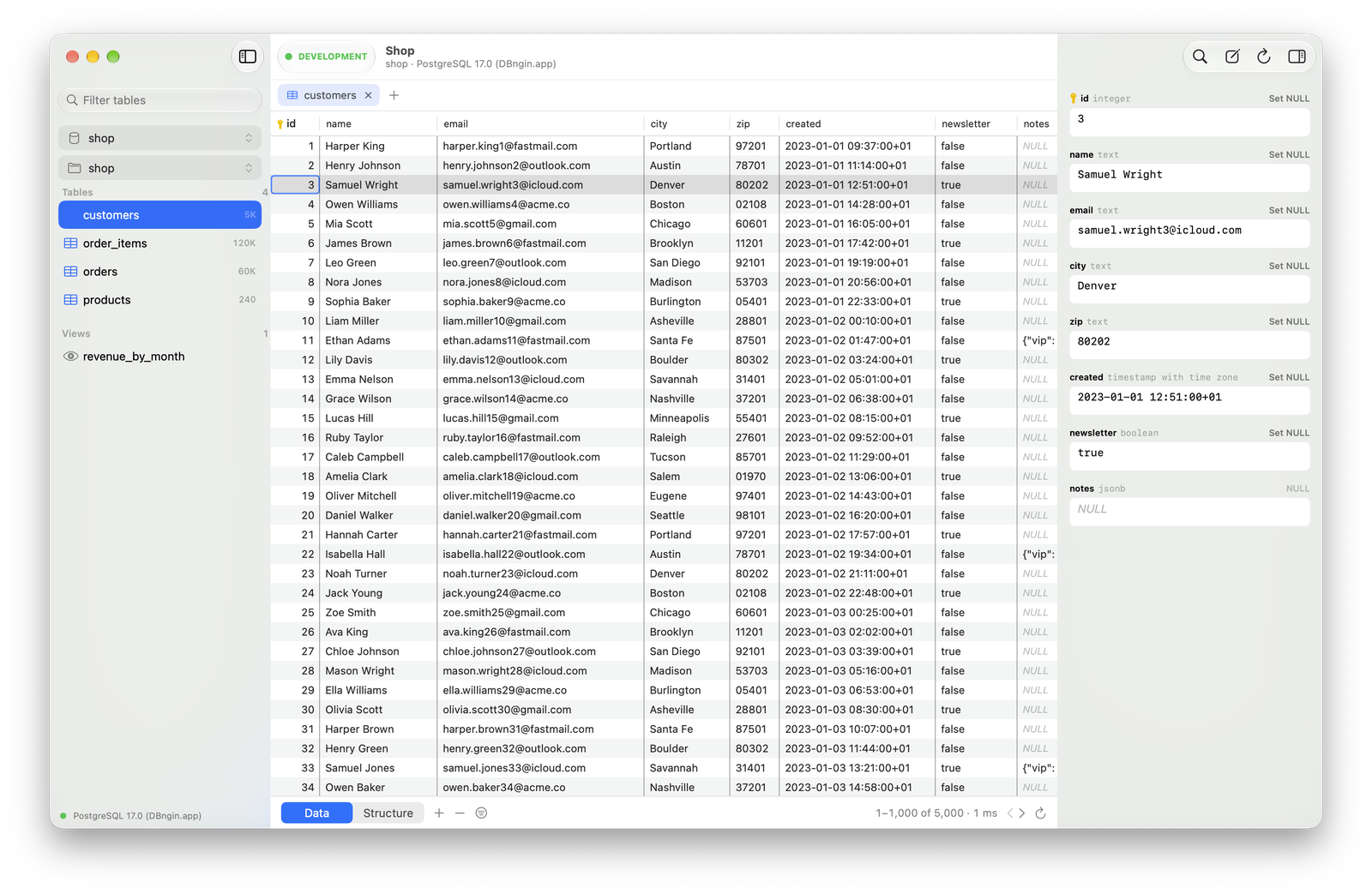
The database engine is written in Rust and keeps results in memory, and the native grid only draws the rows on screen. A table with hundreds of thousands of rows feels as light as one with ten.
Browse and edit
Page through a table, click a column to sort, and filter with contains, =, IN, IS NULL and more – or write your own WHERE.
Edit cells, add, duplicate and delete rows, or set a value to NULL. Your changes are highlighted and saved together in one transaction, and Show SQL previews the exact statements that will run.
SQL editor
Write queries with syntax highlighting and autocompletion, and run them without leaving the keyboard.

SSH and TLS
Reach databases behind a bastion with no extra tools. Tabel uses your private key – ed25519, ECDSA or RSA, passphrase-protected or not – or a password.

From TablePlus
Tabel reads TablePlus' connection list: names, hosts, users, databases, SSH settings, groups, colours and environment tags. Passwords stay in TablePlus' keychain, so Tabel asks for each one once.
Or just paste a URL: postgresql://…, sqlite:///… or a postgresql+ssh:// URL from TablePlus.
Columns, indexes, foreign keys, constraints and the CREATE statement in one place.
Read long text and pretty-printed JSON in the row inspector.
Save or copy as CSV, JSON, SQL INSERT, Markdown or TSV.
Local, development, staging, production … Production gets a red bar, and Tabel asks before you save or run anything that writes.
⌘P finds any table, view or function in a moment.
Work in tabs, and switch database and schema right from the sidebar.
Because a database client should be fast, feel at home on a Mac and cost nothing. Tabel is free with no ads or in-app purchases, built in SwiftUI and AppKit around an engine written in Rust, and it sends nothing about you anywhere. If you have used TablePlus, you already know your way around.
Privacy
Tabel only talks to the databases and SSH servers you connect to. There is no account, and nothing is sent to Peter Theill or anyone else.
Read the privacy policy →Yes. No ads, no in-app purchases and no account.
PostgreSQL and SQLite – including over an SSH tunnel, and with TLS for PostgreSQL.
macOS 26 Tahoe or later. Tabel runs on both Apple silicon and Intel Macs.
Yes. Choose File › Import from TablePlus… and Tabel brings over names, hosts, SSH settings, groups, colours and environments. You enter each password once.
No. Tabel has no analytics or crash reporting and only connects to the servers you set up.
Right here, as a notarized DMG. Tabel is also coming soon to the Mac App Store.
More answers and every keyboard shortcut are on the Support page.
Free, no account. Ready in a minute.
Requires macOS 26 Tahoe or later · Apple silicon and Intel